


/* Jul3/26: Paddle */ /* /Paddle */

LinkOptimizer

for Adobe InDesign

Automate InDesign link preparation for perfect results

Reduce link size • Optimize resolution • Convert colors • Convert formats and much more…

Adobe InDesign CS6 – 2026

macOS 10.12 – 27 (Golden Gate)

LinkOptimizer 7 Released

New in LinkOptimizer 7:

Unprocessed links can now be collected into the same folder as optimized links and relinked — so after processing, you end up with a single folder containing all document links.

Renaming options can now apply to unprocessed links too, so every file follows the same naming convention after processing.

A new popup lets you check, uncheck, or invert your link selection helping fine-tune which links get processed.

WebP links can now be processed and converted to different formats.

Duplicate Links settings now have their own dedicated panel, making them easier to view and configure.

Italic font for ignored links for easier recognition; a warning dialog before deleting presets; info popovers for control descriptions; plus under-the-hood improvements for faster processing.

It’s the first paid LinkOptimizer upgrade in over five years. Upgrading also ensures access to new features and improvements that will continue to be added in free updates.

New in LinkOptimizer 7: All the Details

Copy unprocessed links to the same folder as the processed ones

Export multiple InDesign files to PDF, and Output Factory will combine them into a single PDF for you automatically.

Combine PDFs exported from InDesign

You can now organize your Output Factory workflows in folders for more efficient and convenient workflow management.

PDF workflow folders

Output Factory can automate the output of cloud documents introduced in InDesign 2024. Just open your cloud docs in InDesign export and print them just like regular InDesign files.

Output Factory can automate the output of cloud documents introduced in InDesign 2024. Just open your cloud docs in InDesign export and print them just like regular InDesign files.

IBM Plex Sans can automate the output of cloud documents introduced in InDesign 2024. Just open your cloud docs in InDesign export and print them just like regular InDesign files.

Public Sans Factory can automate the output of cloud documents introduced in InDesign 2024. Just open your cloud docs in InDesign export and print them just like regular InDesign files.

Roboto Factory can automate the output of cloud documents introduced in InDesign 2024. Just open your cloud docs in InDesign export and print them just like regular InDesign files.

Open Sans can automate the output of cloud documents introduced in InDesign 2024. Just open your cloud docs in InDesign export and print them just like regular InDesign files.

Include text from your InDesign document, to which a specific Paragraph or Character style has been applied, in the file names of exported documents.

InDesign paragraph style in variable output name

Additional time-saving options for variable output file names include the output file’s serial number corresponding to its source InDesign document and a random number of a specified length.

Output file # token

The Output Factory code has been overhauled and restructured in a way that allows new features and bug fixes to be implemented much more easily and quickly than before.

LinkOptimizer 7: InDesign CS6 – 2026  |  macOS 10.12 – 26 [Tahoe] + support for forthcoming updates

LinkOptimizer 6: InDesign CS6 – 2026  |  macOS 10.12 – 26 [Tahoe]  Will not support later versions.

LinkOptimizer 5: InDesign CS6 – 2021  |  macOS 10.9 – 11 [Big Sur] 
   To use with recent InDesign/macOS versions, upgrade to LinkOptimizer 7

Optimizing, resizing, and replacing InDesign image links can take hours—or even days—when done manually. LinkOptimizer does it in a fraction of the time, freeing you from tedious, repetitive work.

LinkOptimizer will perform the following main operations for you:

For in-depth details on these and many other options, please see below.

LinkOptimizer Server for workgroups is now available as part of Output Factory Server 3

Reduce link size,
optimize resolution

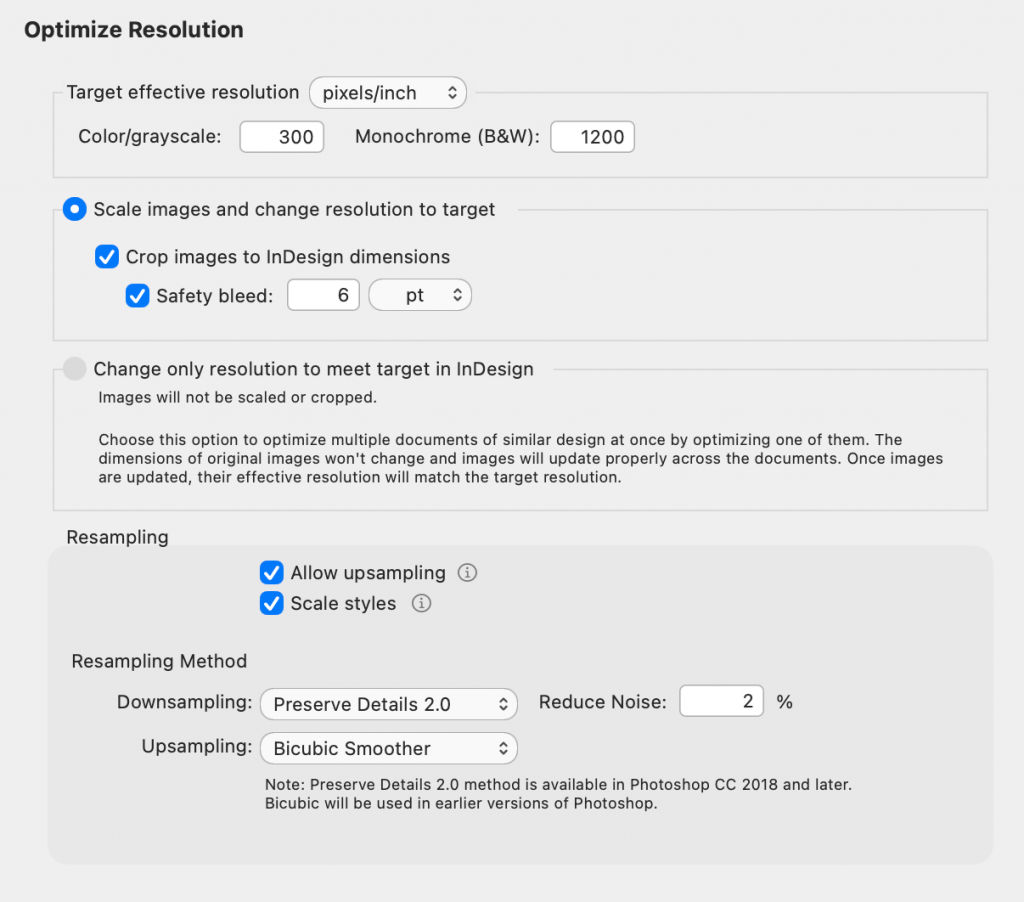
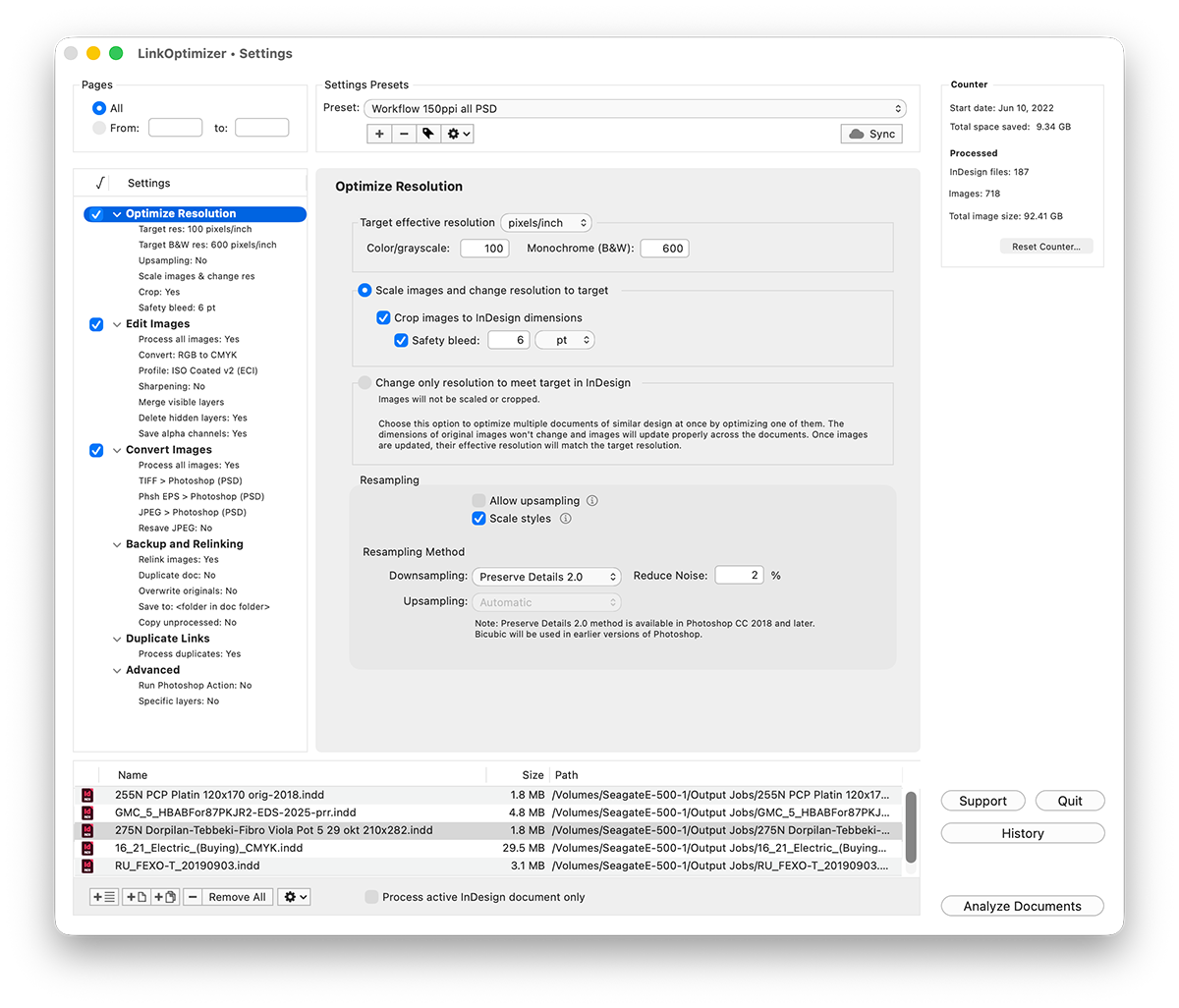
LinkOptimizer automatically eliminates excess image resolution by scaling, cropping, and downsizing links in Photoshop to match their exact InDesign dimensions and your target resolution. Optimized images are then reimported into InDesign at 100% scale. 

This can result in a dramatic reduction in image file size, particularly valuable as the cost of high-capacity storage continues to increase.

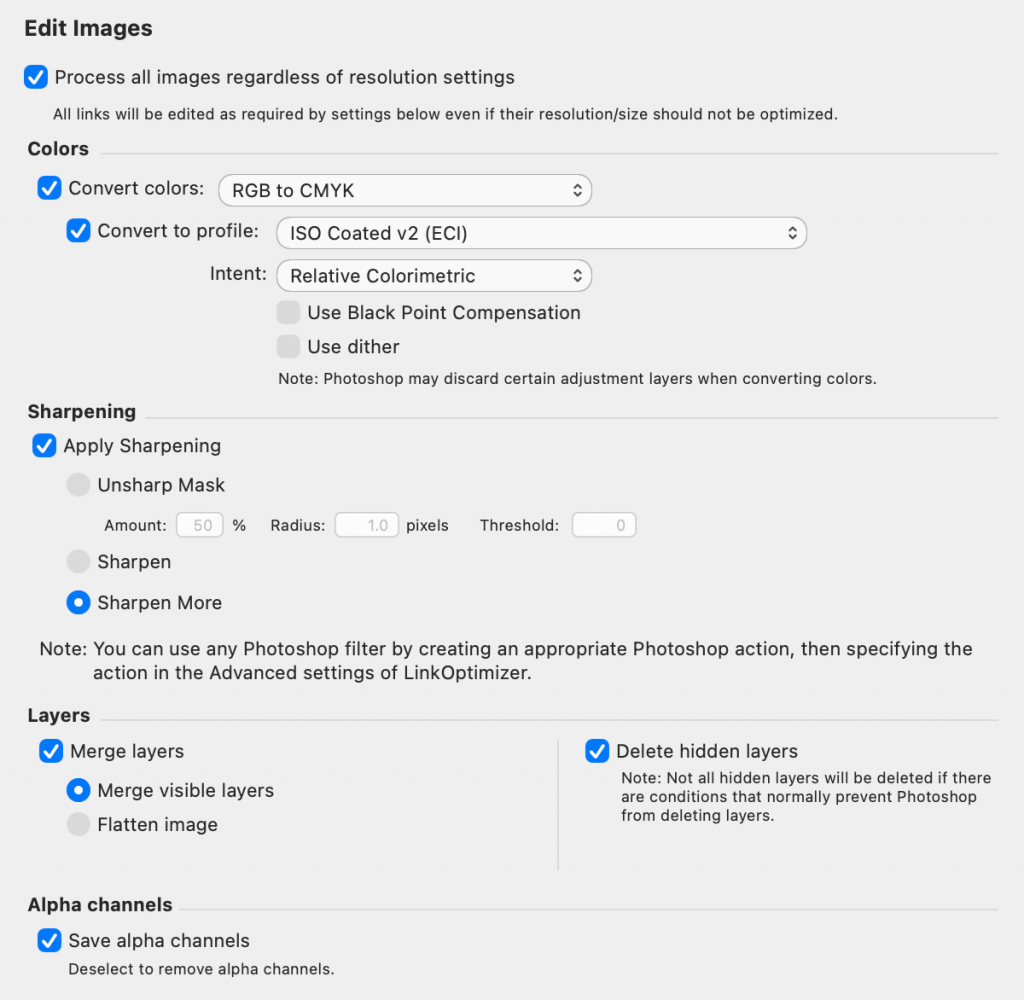
Convert colors and more

Automatically perform image adjustments:
-convert colors to CMYK, RGB and Grayscale
-assign ICC profile
-apply sharpening filters
-merge and delete layers, flatten image

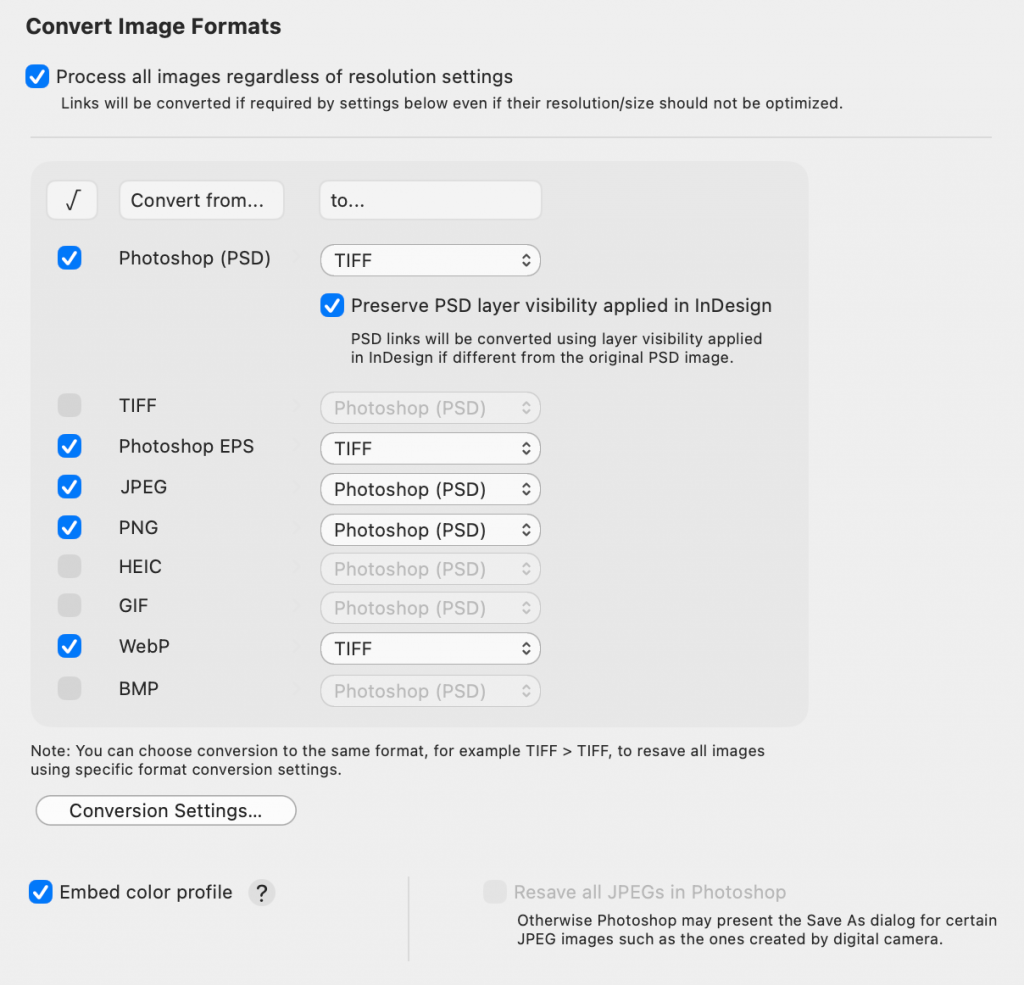
Convert image formats

Automatically convert linked images into preferred formats (e.g., JPEG to TIFF, PNG to PSD) using customizable conversion settings. 

LinkOptimizer for InDesign: Convert image formats screenshot
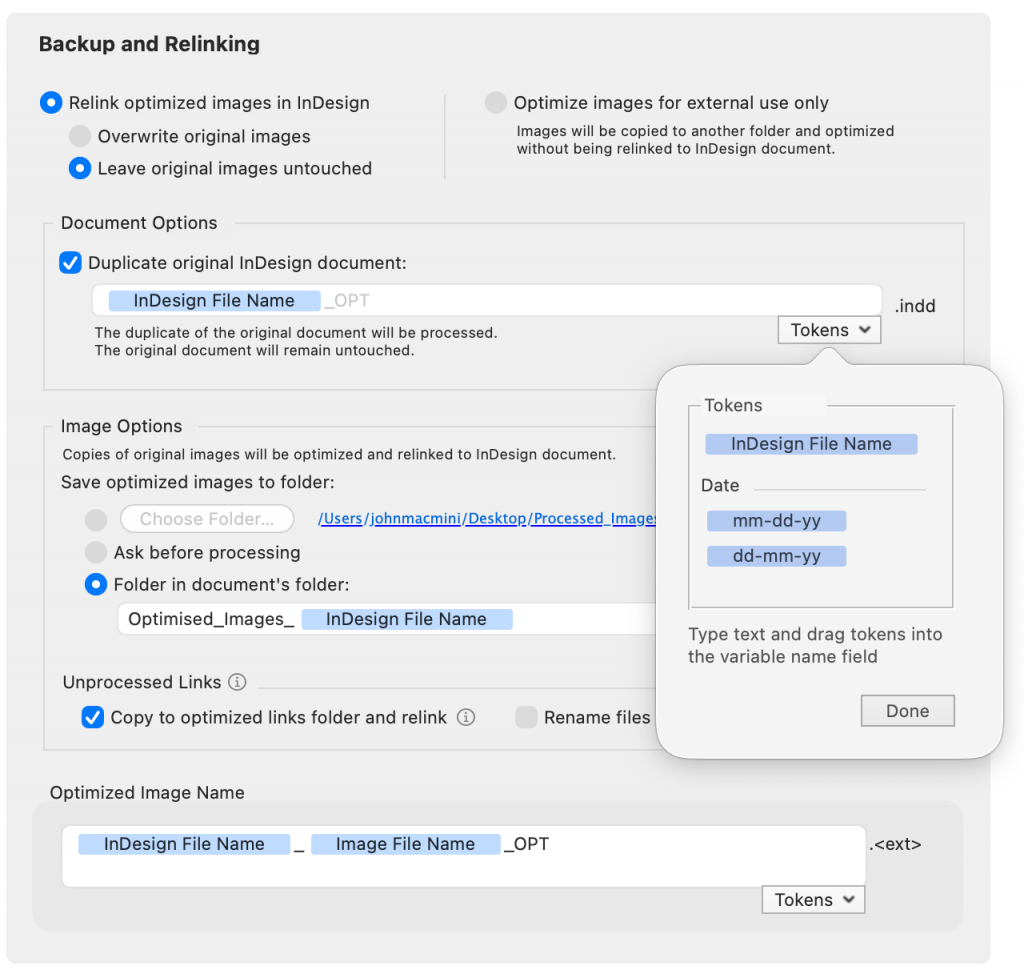
LinkOptimizer for InDesign: Backup optimized links screenshot

Backup and rename images

With LinkOptimizer, your files are always safe: you can either backup original images, or work with their copies. You can also optimize links for external use, such as web design, without relinking them back to InDesign at all.

Run Photoshop Actions​

Run selected Photoshop Actions on each image during processing.

Batch processing

Process multiple InDesign files and books with one click.

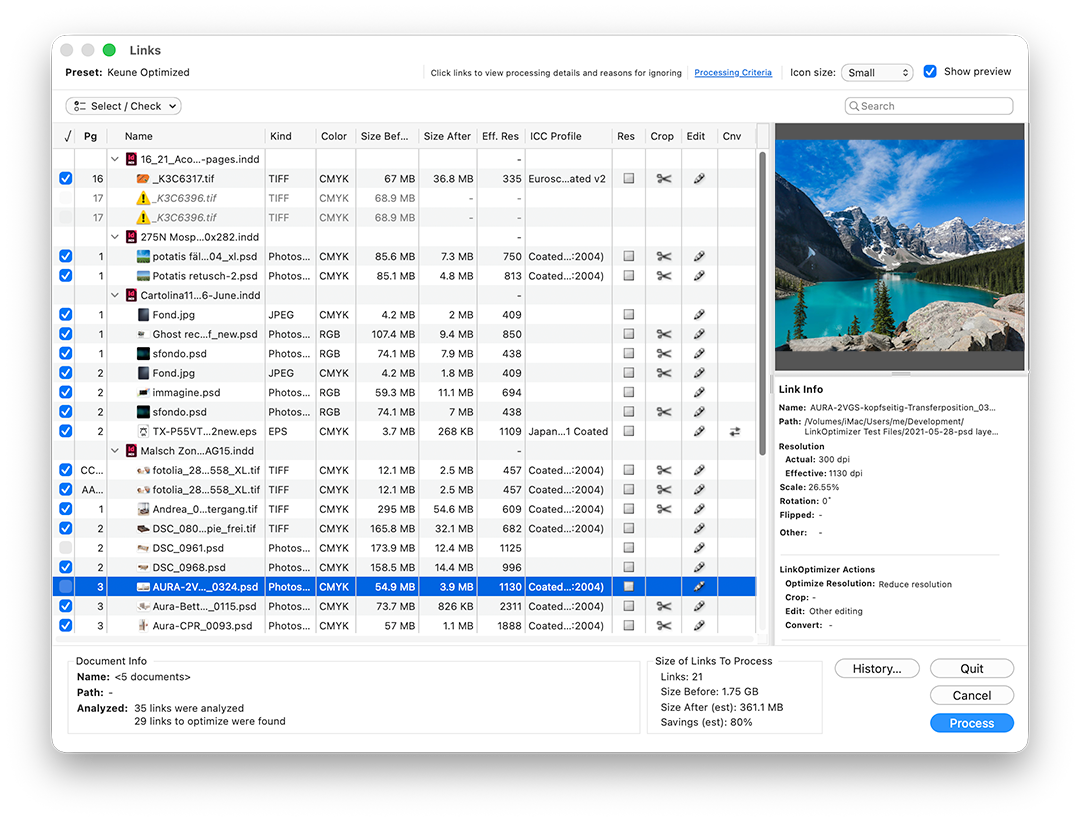
Detailed link info

Get total control over links before optimization. LinkOptimizer analyzes InDesign files to show detailed image info, exact processing actions, and estimated file size savings before launching the process. 

"LinkOptimizer has changed my life and saved me days and days of work as a retoucher for an international quarterly magazine. It's a lifesaver".
Steve Krason
SK Design Group, Chicago
"Today LinkOptimizer batched a huge book project and another magazine project in minutes vs. hours. Now I can take the afternoon off and drink beer. Thanks for freeing up my afternoon, rather than doing production work."
Brian Donahue
Bedesign studio, Minneapolis, Minnesota

LinkOptimizer

$ 259
95
One-time payment
  • ALL FEATURES

LinkOptimizer Lite

$ 179
95
One-time payment
  •        Excludes:
  • Convert formats
  • Run Photoshop actions
  • Process duplicates

UPGRADE to LinkOptimizer 6

Upgrade to LinkOptimizer 6 from earlier versions

For Sales Queries & Product Support