|
InPreflight
Preflight, packaging and reporting beyond InDesign basics

InPreflight Pro $13995
InPreflight Studio $9995
(no advanced packaging)
• Save 10-20% on product bundles
|
Why Markzware Is Afraid of InPreflight?
Markzware registered the domain inpreflight-dot-com just three days after the first public beta of InPreflight™ was released. And humbly redirected it to their own site. It was on October 20, 2006. Why would such an established and well known company as Markzware employ such cheap and low business tactics? Did creators of FlightCheck want to snitch a few clicks from Zevrix - which was a really young company back then? Or did they realize that InPreflight will quickly become the preflight software of choice for InDesign users - and wanted to be a part of this success (albeit in a strange way)? Whatever the reasons are, we're flattered by these actions of Markzware as it's just another evidence that InPreflight was a groundbreaking preflight solution from the very beginning. Leo Revzin
Owner, Zevrix Solutions
MAJOR FEATURES
- Quickly check document fonts, colors and links.
- Find hidden errors not reported by InDesign.
- Presents extensive info in an easy to understand form.
- Instantly locate problems according to preflight presets.
- Auto-packaging of multiple documents (InPreflight Pro only).
- Interactive PDF preflight reports.
SOLUTIONS
InPreflight is an all-in-one preflight, packaging and reporting solution.
InPreflight Pro vs InPreflight Studio: Advanced Packaging isn't available in InPreflight Studio. All other functionality is identical.
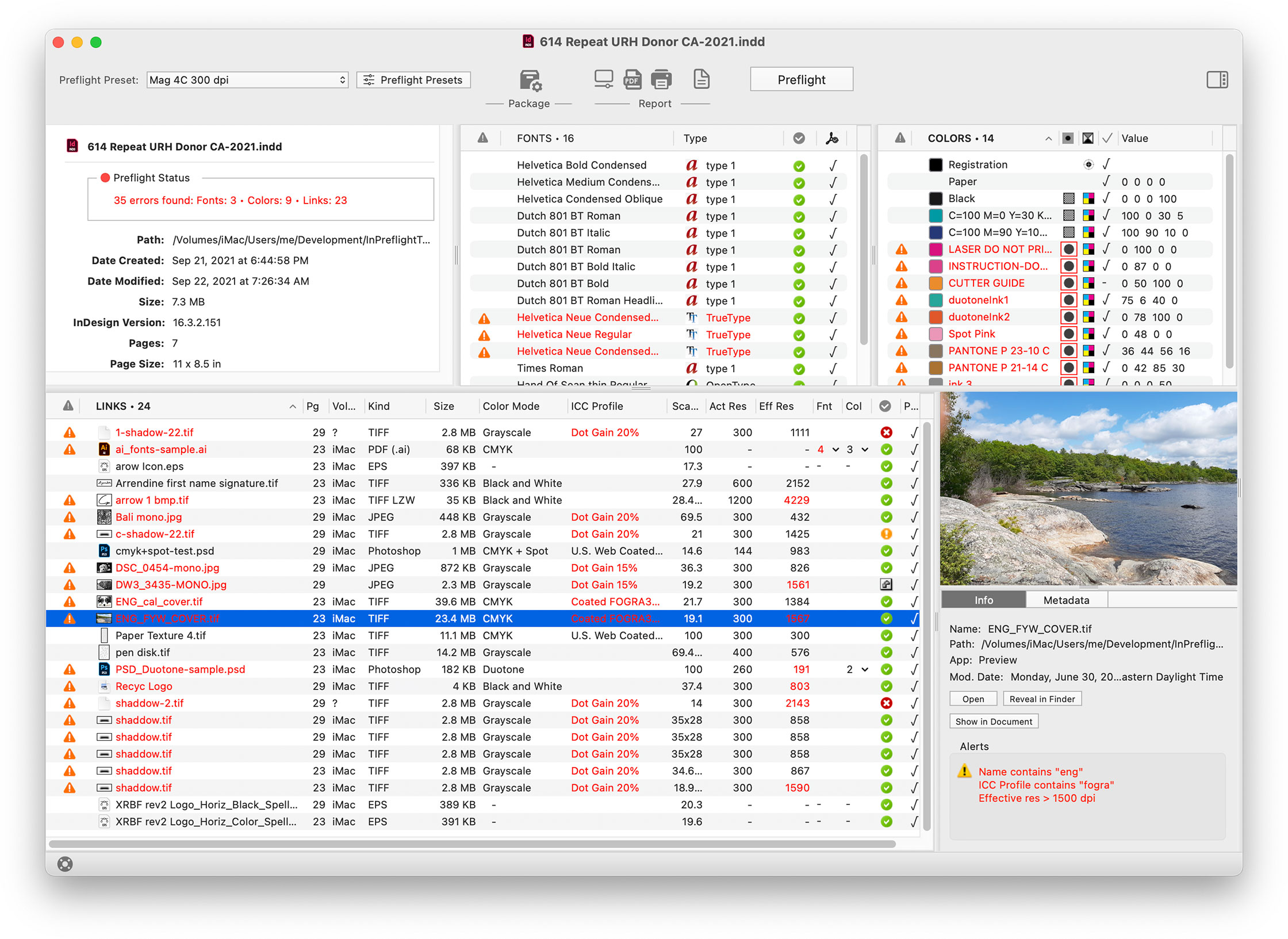
PREFLIGHT. InPreflight is a comprehensive quality control solution which saves hours of checking InDesign documents manually and dealing with consequences of costly mistakes. It quickly checks document fonts, colors and links - InPreflight is on average 2-10 times faster than FlightCheck - and lets you instantly locate potential problems according to user-defined preflight presets. With InPreflight's carefully structured interface you can make decisions quickly and easily.
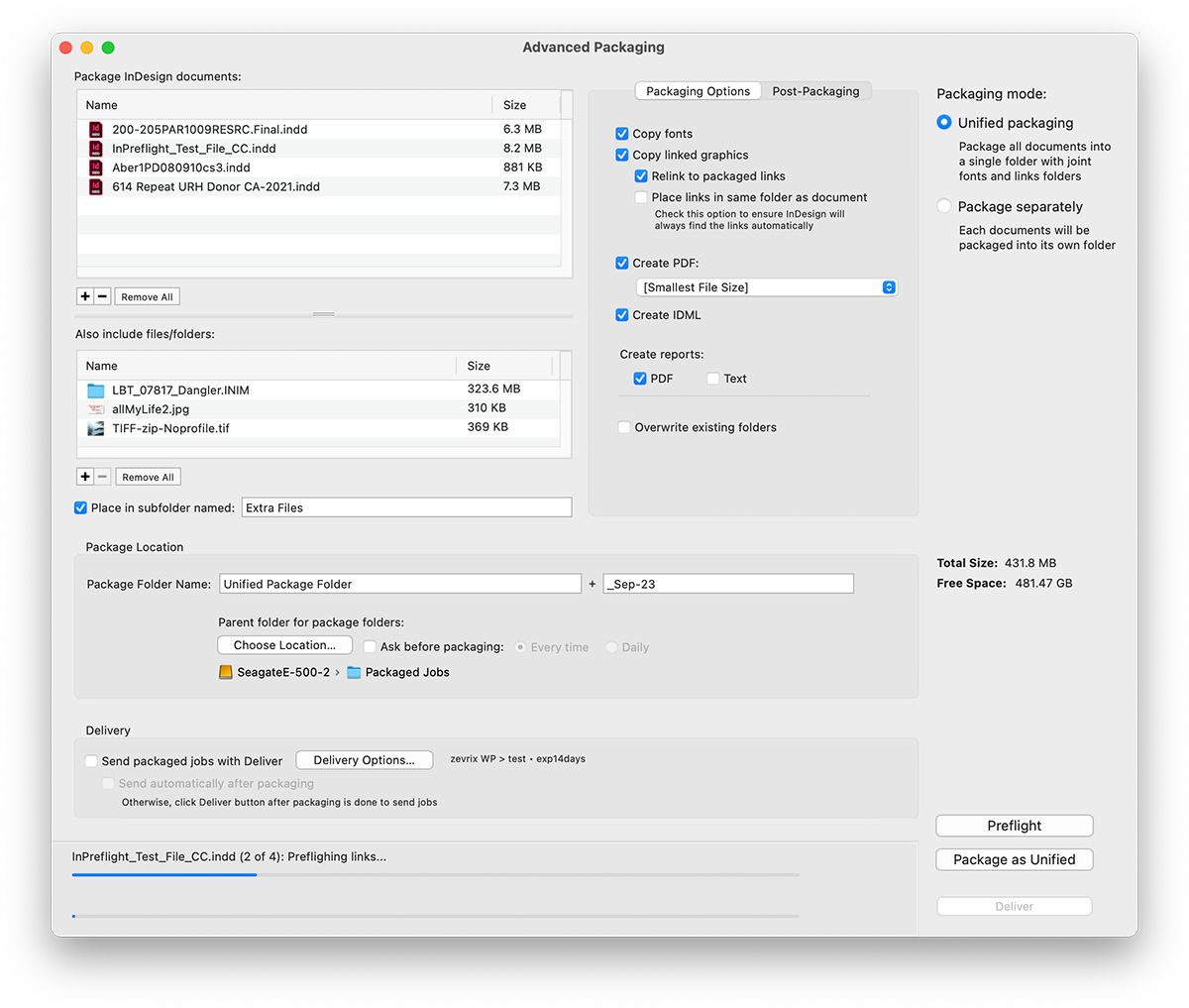
PACKAGING. InPreflight Pro is also a powerful packaging automation solution which allows users to preflight and package multiple documents. Among other abilities, it can collect all files into one folder, eliminating the need to collect the same links multiple times for each design. The savings result in gigabytes of space and hours of production time.
(InPreflight Pro only)
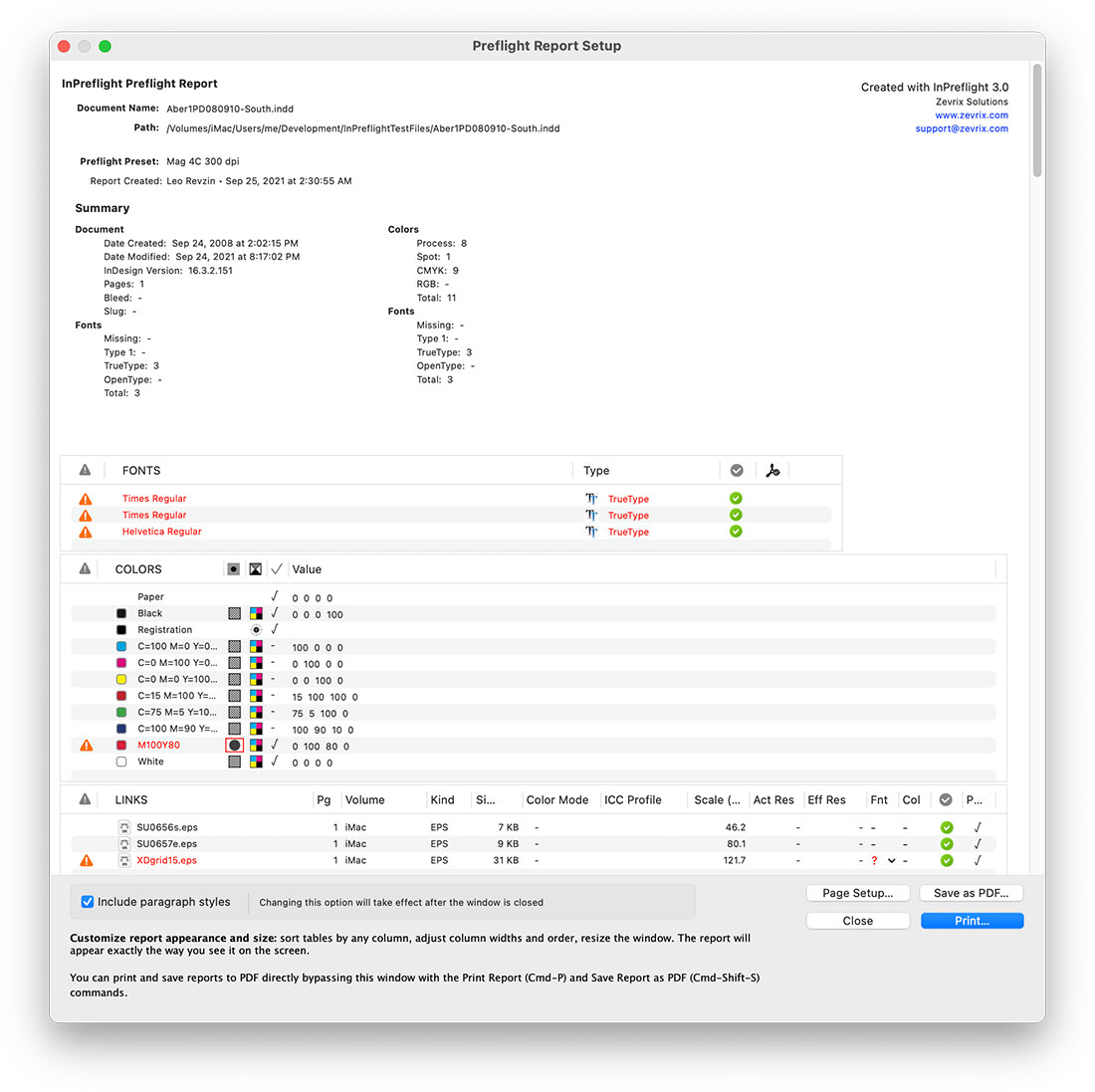
REPORTS. InPreflight lets users print graphic preflight reports and save them as fully searchable interactive PDF files, providing an easy way to analyze, archive and send reports to service providers. Supplying InPreflight report with your job is like sending along a copy of InPreflight. The PDF reports are like interactive screenshots of the InPreflight window with the detailed link info saved in PDF comments.
FEATURES OVERVIEW
PREFLIGHT
- Quickly check document's fonts, colors and links. InPreflight is on average 2 - 10 times faster than FlightCheck.
- Sort preflight results by any attribute.
Links
- Get extensive info on links attributes such as kind, size, effective resolution, color, fonts and many others (see detailed list here).
- Reveal link attributes otherwise unavailable in InDesign, such as TIFF compression and embedded fonts.
- Warn about "forbidden" names and locations. For example, warn about links which are not located in the folder "Hi-Res", or whose name contains "_random".
- Open links in their default application, show in InDesign and reveal in Finder.
Colors
- List color space (CMYK/RGB/Lab), model (Process/Spot), value and used status.
- List unnamed colors.
- Check documents for Registration color used in text.
Fonts
- Check font type, status and PDF embedding permissions.
- Update fonts status as you activate them in the system.
PREFLIGHT PRESETS
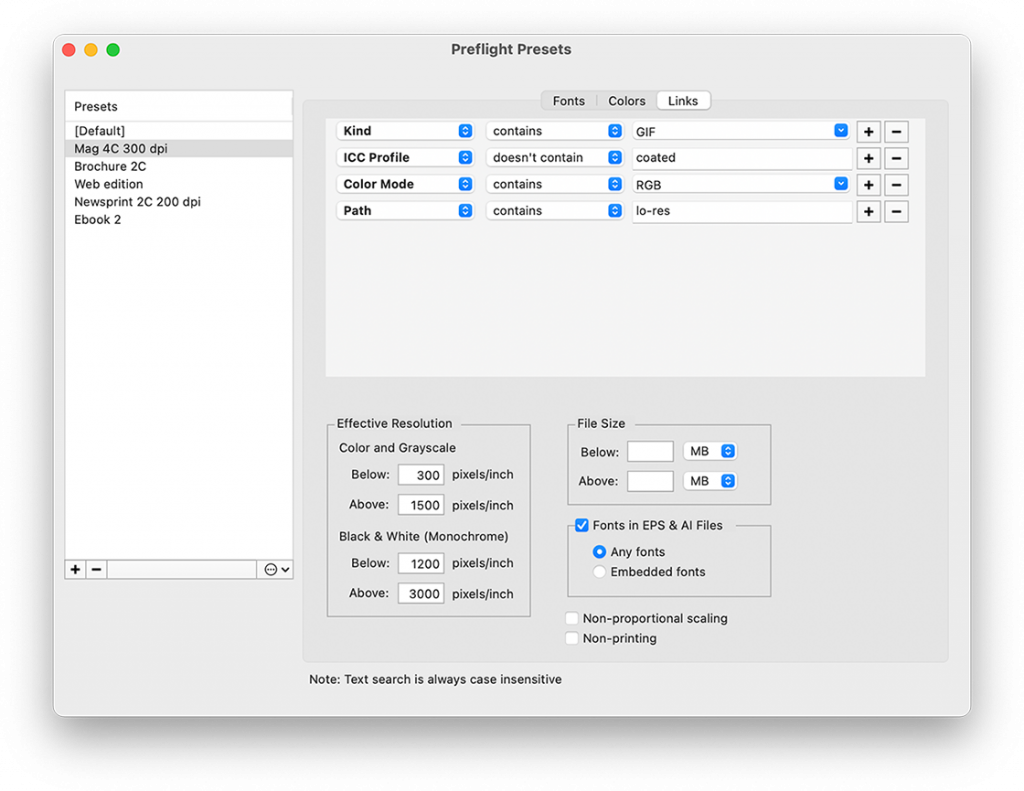
- Create preflight presets for various job types to check your documents for specific attributes. For example, create different presets for newspapers, magazines and spot color brochures, which will warn you different link resolution, color usage and other attributes.
- Reassess preflight results with different presets instantly without the need to re-preflight your document.
AUTOMATED PACKAGING
- Automate packaging of multiple documents with the option to collect them all in one folder or separately.
- InPreflight can collect all mutual files into one folder, so you don't need to collect the same links multiple times for each design. This can save you gigabytes of space and hours of production time when collecting InDesign files that share the same linked images.
- You can also choose to collect each file separately - InPreflight will automatically create separate folder for each document and collect there all required elements.
- Add extra files and folders not directly related to the document.
- Collect links into the same folder as the original document - InDesign will always find the links automatically when you send the job to your service provider or move it to another volume.
- Tell InPreflight to open the collected documents and folders automatically so you don't have to chase them in the Finder.
- InPreflight can ask you to choose the destination folder for your collected jobs every time you package the documents or daily.
REPORTS
- Print and save reports as interactive PDF.
- PDF report is like a copy of InPreflight with the detailed link info saved in PDF comments.
- Customize reports interactively.
- Include complete Paragraph Styles report.
- Save text-only reports.
Link Attributes reported by InPreflight
(red type = info not available in InDesign)
| Attribute |
Notes |
| Name |
|
| Path |
|
| Volume |
|
| Kind |
such as TIFF, EPS, JPEG, PNG etc. including:
TIFF compression (LZW/JPEG/ZIP),
EPS JPEG compression |
| Size |
|
| Color Mode |
CMYK, RGB, CMYK+Spot etc. including: Multichannel, Duotone mode in Photoshop files; color mode of Illustrator (native and EPS) files (RGB/CMYK) |
| Scale (%) |
|
| Actual Resolution |
including: Duotone
and monochrome EPS images |
| Effective Resolution |
| Fonts in Illustrator (.ai) files |
|
| Fonts in vector EPS files |
including: Embedded fonts |
| Spot colors in Illustrator (.ai) files |
|
| Spot colors in vector EPS files |
|
| Spot colors in Duotone and DCS files |
|
| Status |
|
| Non-printing status |
|
| "Forbidden" locations and names |
|
System Requirements
• Adobe InDesign CS/CS2/CS3/CS4
• Mac OS X 10.4.2 (or later), Leopard compatible

|
In the Media
.................................
InPreflight is delightfully simple to use and does its job well.
James Dempsey
| Read article

InPreflight is what InDesign's preflight should have been.
David Creamer | Read article

InPreflight offers healthy competition for some of the larger, more mature software competitors.
Janet Frick

Users Say...
.................................
"Where has this software been all my life? Wow!.. InPreflight just saved me about 9 hours work…"
Paul Rhetts,
LPD Press & Tradicion Revista
"Loving it…
Really loving it."
Paul Everett,
Concrete Creative Limited
"What a great program, what Adobe should have included from the beginning."
R.C., Impact Business Development
"I found InPreflight to be an excellent program to use. It lets me know if I have any problems with the job I'm doing before I write a pdf."
Peter McDonnell, Avondale Heights, Australia
"What FlightCheck should have been!
All of their versions do the same as your software at only 10 times the price and 10 times slower at least."
Darren Rath,
Melbourne, Australia
"Love the programme – a real time saver in prepress situations... InPreflight is great at finding problems ahead of schedule."
John Farnell,
New Zealand
|